Neural network-powered text-to-speech in Russian and English directly on your compute
Content: text (0 symbol)
Uploaded: 22.05.2026
Positive responses: 0
Negative responses: 0
Sold: 0
Refunds: 0
~ $6
The exact amount is on the payment page
BLS VOICE — PROFESSIONAL NEURAL NETWORK VOICE-OVER
FOR WINDOWS
Full version forever. No subscriptions or limits on the number of audio files created.
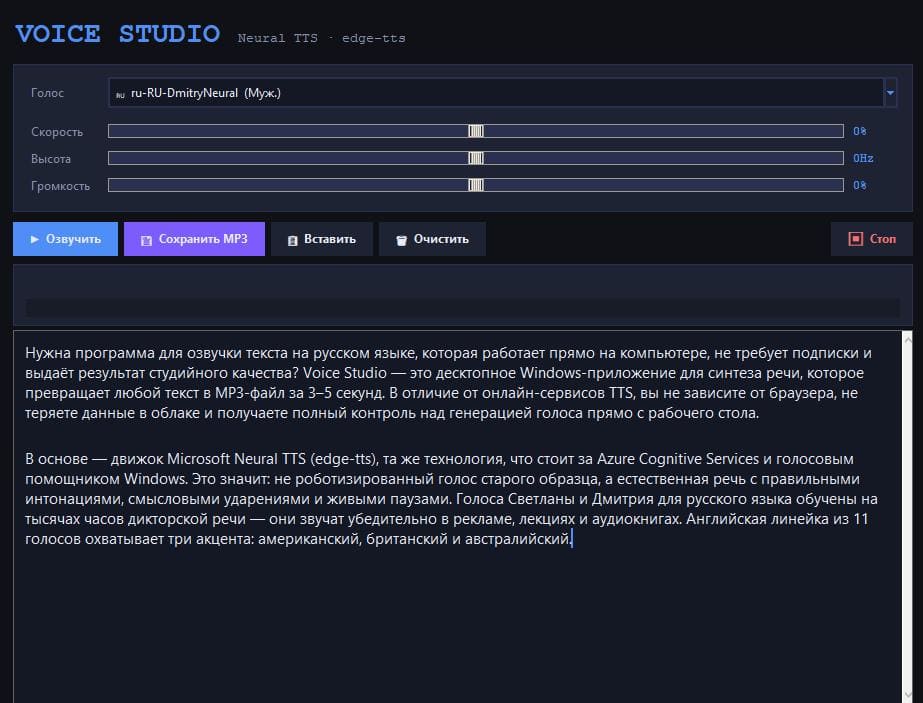
BLS Voice is a convenient Windows application for converting text into natural speech using modern neural network synthesis technologies. The program allows you to quickly create high-quality voice-overs in Russian and English and save the results in MP3 format.
The voice sounds natural, with intonations, pauses, and an expressive .
WHY CHOOSE BLS VOICE
✔ One-time purchase – the program is yours forever
✔ User-friendly graphical interface without the command line
✔ High-quality speech synthesis
✔ Russian and English language support
✔ Customizable voice settings
✔ Save finished audio files in MP3 format
✔ Compatible with Windows 10 and Windows 11
KEY PROGRAM FEATURES
▸ Text-to-speech in Russian and English
The program supports several high-quality voices. The user
chooses the most suitable option depending on the task:
educational materials, presentations, informational messages,
audio content, and other projects.
▸ Flexible voice settings
Available settings:
• playback speed
• voice pitch
• volume level
This allows you to adapt the sound to various formats and usage scenarios.
▸ Quickly create audio files
After entering text, simply click the start synthesis button to immediately
listen to the result and, if necessary, save it to your computer.
Finished files are saved in the popular MP3 format.
▸ User-friendly interface
The program features a simple and intuitive interface that allows
you to start working immediately after installation.
Additional features available:
• Paste text from the clipboard
• Clear the editor
• Stop the synthesis process
• Display progress
• Quick access to key settings
For a comfortable work experience, a modern dark mode interface is available.
WHO WILL BE USEFUL THIS PROGRAM
➤ Authors and content creators
Preparing audio versions of texts, articles, presentations, and other materials.
➤ Teachers and authors of educational materials
Voiceover for lectures, courses, and educational content.
➤ Marketers and communications specialists
Creating informational and presentation audio materials.
➤ Video content creators
Preparing voiceovers and voiceovers for video materials.
➤ Businesses
Preparing presentations, informational messages, and internal
materials.
➤ Software developers
Testing solutions related to voice interfaces.
HOW TO WORK WITH BLS VOICE
1. Download and install the program.
2. Enter or paste text into the editor.
3. Select a voice and adjust the audio parameters if necessary.
4. Start the speech synthesis process.
5. Listen to the result and save the audio file in MP3 format.
The program is suitable for both short texts and long
documents.
PRIVACY
User-created audio files are stored exclusively on the user´s computer.
LICENSE TERMS
✓ Lifetime license for one device
✓ One-time payment
✓ Up to 5 reinstalls on one computer
✓ Hardware-based license locking to protect against unauthorized copying
✓ No subscriptions or hidden fees
SYSTEM REQUIREMENTS
→ Operating system: Windows 10 / Windows 11 (64-bit)
→ Installation: User-friendly installation wizard
→ Internet connection: Required for speech synthesis
→ RAM: 1 GB or more
→ Free space: approximately 80 MB
→ Interface language: English / Russian
→ Minimum resolution: 1024×600
→ Recommended: 1280×720 and higher
IMPORTANT
This program is intended for creating audio materials within the framework of applicable laws and in compliance with copyrights third parties.
The user is solely responsible for the content
of the materials they create and for copyright compliance.
FOR WINDOWS
Full version forever. No subscriptions or limits on the number of audio files created.
BLS Voice is a convenient Windows application for converting text into natural speech using modern neural network synthesis technologies. The program allows you to quickly create high-quality voice-overs in Russian and English and save the results in MP3 format.
The voice sounds natural, with intonations, pauses, and an expressive .
WHY CHOOSE BLS VOICE
✔ One-time purchase – the program is yours forever
✔ User-friendly graphical interface without the command line
✔ High-quality speech synthesis
✔ Russian and English language support
✔ Customizable voice settings
✔ Save finished audio files in MP3 format
✔ Compatible with Windows 10 and Windows 11
KEY PROGRAM FEATURES
▸ Text-to-speech in Russian and English
The program supports several high-quality voices. The user
chooses the most suitable option depending on the task:
educational materials, presentations, informational messages,
audio content, and other projects.
▸ Flexible voice settings
Available settings:
• playback speed
• voice pitch
• volume level
This allows you to adapt the sound to various formats and usage scenarios.
▸ Quickly create audio files
After entering text, simply click the start synthesis button to immediately
listen to the result and, if necessary, save it to your computer.
Finished files are saved in the popular MP3 format.
▸ User-friendly interface
The program features a simple and intuitive interface that allows
you to start working immediately after installation.
Additional features available:
• Paste text from the clipboard
• Clear the editor
• Stop the synthesis process
• Display progress
• Quick access to key settings
For a comfortable work experience, a modern dark mode interface is available.
WHO WILL BE USEFUL THIS PROGRAM
➤ Authors and content creators
Preparing audio versions of texts, articles, presentations, and other materials.
➤ Teachers and authors of educational materials
Voiceover for lectures, courses, and educational content.
➤ Marketers and communications specialists
Creating informational and presentation audio materials.
➤ Video content creators
Preparing voiceovers and voiceovers for video materials.
➤ Businesses
Preparing presentations, informational messages, and internal
materials.
➤ Software developers
Testing solutions related to voice interfaces.
HOW TO WORK WITH BLS VOICE
1. Download and install the program.
2. Enter or paste text into the editor.
3. Select a voice and adjust the audio parameters if necessary.
4. Start the speech synthesis process.
5. Listen to the result and save the audio file in MP3 format.
The program is suitable for both short texts and long
documents.
PRIVACY
User-created audio files are stored exclusively on the user´s computer.
LICENSE TERMS
✓ Lifetime license for one device
✓ One-time payment
✓ Up to 5 reinstalls on one computer
✓ Hardware-based license locking to protect against unauthorized copying
✓ No subscriptions or hidden fees
SYSTEM REQUIREMENTS
→ Operating system: Windows 10 / Windows 11 (64-bit)
→ Installation: User-friendly installation wizard
→ Internet connection: Required for speech synthesis
→ RAM: 1 GB or more
→ Free space: approximately 80 MB
→ Interface language: English / Russian
→ Minimum resolution: 1024×600
→ Recommended: 1280×720 and higher
IMPORTANT
This program is intended for creating audio materials within the framework of applicable laws and in compliance with copyrights third parties.
The user is solely responsible for the content
of the materials they create and for copyright compliance.
No feedback yet