No-code browser automation with human-like emulation
Content: text (0 symbol)
Uploaded: 23.06.2026
Positive responses: 0
Negative responses: 0
Sold: 0
Refunds: 0
~ $69
The exact amount is on the payment page
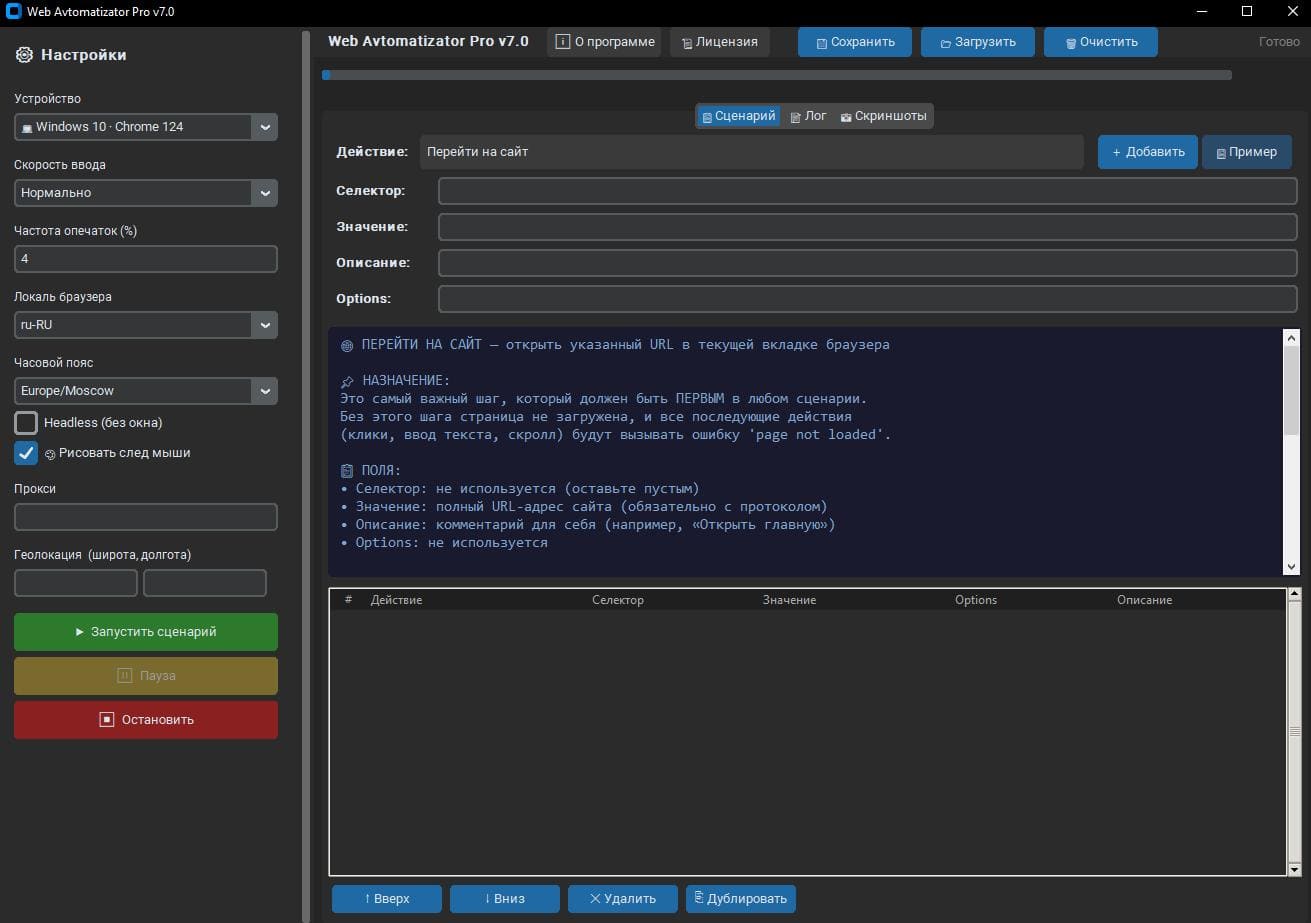
WEB AUTOMATIZATOR PRO v7.0 — VISUAL AUTOMATION OF WORK IN
A WINDOWS BROWSER
Do you perform the same actions in your browser over and over again?
Filling out forms, processing information, testing web services,
monitoring website changes, and other repetitive tasks can be
automated without programming skills.
Web Automatizator Pro helps reduce the time spent on routine operations and improve the efficiency of your daily work.
WHAT IS WEB AUTOMATIZATOR PRO
Web Automatizator Pro is a professional Windows application
for creating and running browser automation scripts.
The program allows you to assemble action sequences from ready-made
blocks and run them automatically.
No programming or scripting knowledge is required.
The user simply selects the required actions, configures the parameters,
and runs the script.
WHAT CAN YOU USE THE PROGRAM FOR?
✔ Automate repetitive browser actions
✔ Fill out web forms and process information
✔ Monitor website changes
✔ Track prices, product availability, and information updates
✔ Collect open data from publicly available sources in accordance with the site´s rules
✔ Test and validate web applications
✔ Automate internal business processes
✔ Perform recurring tasks without manual intervention
KEY FEATURES
★ VISUAL SCRIPTION DESIGNER
Create automation scripts without programming.
Simply select an action from the list, configure the parameters, and save the script.
Supported features:
- Reorder steps;
- Copy and duplicate actions;
- Quickly edit parameters;
- Save and load scripts.
All scripts are saved in a convenient JSON format and are easily transferred between devices.
★ OVER 50 READY-MADE ACTIONS
The program comes with built-in automation tools:
- URL navigation;
- clicks and interactions with page elements;
- text input;
- page scrolling;
- event waiting;
- working with files;
- executing custom JavaScript scripts;
- taking screenshots;
- working with browser data;
- managing session settings.
And much more.
★ FLEXIBLE CONFIGURATION OF OPERATING PARAMETERS
The program allows you to configure various browser session parameters
for testing and reproducing various user scenarios.
The following settings are supported:
- browser window size;
- interface language;
- locale;
- time zone;
- display parameters;
- device profiles for testing the responsiveness of web interfaces. This is especially convenient when testing websites and web applications on various types of devices.
★ PROXY SUPPORT
HTTP and HTTPS proxies with authorization are supported.
Using a proxy allows you to work in various network
configurations and test the behavior of web applications under different connection conditions.
★ SCRIPT EXECUTION VISUALIZATION
During script execution, the program can display actions
directly on top of the page.
This helps you monitor the process, analyze script execution, and
simplifies debugging.
LICENSE TERMS
✓ Lifetime license.
✓ No monthly payments or subscriptions.
✓ The license is for use on one computer.
✓ Up to 5 reinstallations on one device.
✓ Email technical support included.
SPECIFICATIONS
→ Operating system: Windows 10 / Windows 11 (64-bit)
→ Browser: Chromium (downloads automatically if needed)
→ RAM: Minimum 2 GB, 8 GB recommended
→ Free disk space: Approximately 500 MB
→ Internet connection: Required
→ Version: 7.0
→ Number of built-in actions: Over 50
→ Interface language: English / Russian
A WINDOWS BROWSER
Do you perform the same actions in your browser over and over again?
Filling out forms, processing information, testing web services,
monitoring website changes, and other repetitive tasks can be
automated without programming skills.
Web Automatizator Pro helps reduce the time spent on routine operations and improve the efficiency of your daily work.
WHAT IS WEB AUTOMATIZATOR PRO
Web Automatizator Pro is a professional Windows application
for creating and running browser automation scripts.
The program allows you to assemble action sequences from ready-made
blocks and run them automatically.
No programming or scripting knowledge is required.
The user simply selects the required actions, configures the parameters,
and runs the script.
WHAT CAN YOU USE THE PROGRAM FOR?
✔ Automate repetitive browser actions
✔ Fill out web forms and process information
✔ Monitor website changes
✔ Track prices, product availability, and information updates
✔ Collect open data from publicly available sources in accordance with the site´s rules
✔ Test and validate web applications
✔ Automate internal business processes
✔ Perform recurring tasks without manual intervention
KEY FEATURES
★ VISUAL SCRIPTION DESIGNER
Create automation scripts without programming.
Simply select an action from the list, configure the parameters, and save the script.
Supported features:
- Reorder steps;
- Copy and duplicate actions;
- Quickly edit parameters;
- Save and load scripts.
All scripts are saved in a convenient JSON format and are easily transferred between devices.
★ OVER 50 READY-MADE ACTIONS
The program comes with built-in automation tools:
- URL navigation;
- clicks and interactions with page elements;
- text input;
- page scrolling;
- event waiting;
- working with files;
- executing custom JavaScript scripts;
- taking screenshots;
- working with browser data;
- managing session settings.
And much more.
★ FLEXIBLE CONFIGURATION OF OPERATING PARAMETERS
The program allows you to configure various browser session parameters
for testing and reproducing various user scenarios.
The following settings are supported:
- browser window size;
- interface language;
- locale;
- time zone;
- display parameters;
- device profiles for testing the responsiveness of web interfaces. This is especially convenient when testing websites and web applications on various types of devices.
★ PROXY SUPPORT
HTTP and HTTPS proxies with authorization are supported.
Using a proxy allows you to work in various network
configurations and test the behavior of web applications under different connection conditions.
★ SCRIPT EXECUTION VISUALIZATION
During script execution, the program can display actions
directly on top of the page.
This helps you monitor the process, analyze script execution, and
simplifies debugging.
LICENSE TERMS
✓ Lifetime license.
✓ No monthly payments or subscriptions.
✓ The license is for use on one computer.
✓ Up to 5 reinstallations on one device.
✓ Email technical support included.
SPECIFICATIONS
→ Operating system: Windows 10 / Windows 11 (64-bit)
→ Browser: Chromium (downloads automatically if needed)
→ RAM: Minimum 2 GB, 8 GB recommended
→ Free disk space: Approximately 500 MB
→ Internet connection: Required
→ Version: 7.0
→ Number of built-in actions: Over 50
→ Interface language: English / Russian
No feedback yet