Neverwinter Cape of the Noble North Key - Global - PC
Content: text (0 symbol)
Available: 5
Uploaded: 25.06.2026
Positive responses: 0
Negative responses: 0
Sold: 0
Refunds: 0
~ $3.31
The exact amount is on the payment page
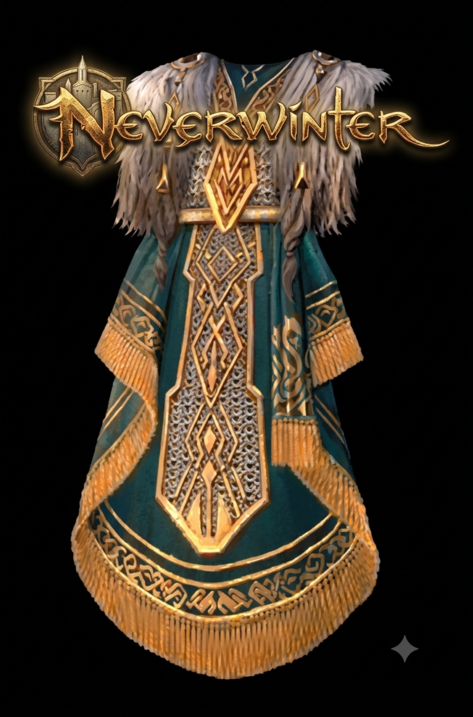
Immediately after purchasing this product, you will receive a license key for the Cape of the Noble North (shown in the screenshot) in the game "Neverwinter"
By activating this code, you will receive:
Cape of the Noble North Skin Key
How to Redeem:
1. Download and log into the Arc Client https://www.arcgames.com/en/about/client
2. Click on the gear icon located on the top right of the client. Select “Activate a Product” and enter your code.
3. Log into the game and complete the tutorial if you have not done so. At this point, the Reward can be claimed at the Rewards Claim Agent in Protector’s Enclave.
4. - PC only.
- Can be claimed once per account after the player completes the tutorial.
- All items are bound to the account they are claimed on.
- Item can be claimed in the Promotions tab in the Zen Store.
The key has no territorial restrictions and is suitable for activation in any region.
Suitable for PC Only
Only 1 code of this type can be activated per account.
By activating this code, you will receive:
Cape of the Noble North Skin Key
How to Redeem:
1. Download and log into the Arc Client https://www.arcgames.com/en/about/client
2. Click on the gear icon located on the top right of the client. Select “Activate a Product” and enter your code.
3. Log into the game and complete the tutorial if you have not done so. At this point, the Reward can be claimed at the Rewards Claim Agent in Protector’s Enclave.
4. - PC only.
- Can be claimed once per account after the player completes the tutorial.
- All items are bound to the account they are claimed on.
- Item can be claimed in the Promotions tab in the Zen Store.
The key has no territorial restrictions and is suitable for activation in any region.
Suitable for PC Only
Only 1 code of this type can be activated per account.
Code is not refundable. Replacement only possible if you have a video from the moment of purchase to the activation if you have any issue with the code.
No feedback yet