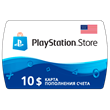
PlayStation Network Card USD 10 Gift Card US
Positive responses: 0
Negative responses: 0
Sold: 0
Refunds: 0
~ $14.13
The exact amount is on the payment page

After payment, you will receive a $10 PlayStation Network Card activation key.
A link to the key page will be sent to the email address you provided during purchase.
Platform: PS4
Region: United States
This card allows you to add $10 to your US PlayStation Network account (PlayStation US Store).
Please note: This card is only for use with accounts registered in the United States of America.
A link to the key page will be sent to the email address you provided during purchase.
Platform: PS4
Region: United States
This card allows you to add $10 to your US PlayStation Network account (PlayStation US Store).
Please note: This card is only for use with accounts registered in the United States of America.
Activation - PSN
Instructions for activating a digital code on a computer:
Go to https://store.playstation.com
Log in to your account.
Click your avatar at the top of the screen.
Select Redeem Code from the drop-down menu.
Enter the code and click Redeem.
The funds or content will be added to your account.
Instructions for activating a digital code on PlayStation 4:
From the PS4 home screen, go to PlayStation Store.
Select "Redeem Codes" from the list on the left side of the store screen.
Enter your code and press X to continue.
The content for which you activated the code will appear on the screen. Press X to confirm activation.
A message will then appear confirming that the code has been activated. Click "OK."
The content should begin downloading automatically, but if it doesn´t, or you want to do it manually, visit the game page in your library.
Select "PlayStation™Store," go to the "Your Add-ons" section, and press X.
Here you can select the items you want to download to your console.
Instructions for activating a digital code on a computer:
Go to https://store.playstation.com
Log in to your account.
Click your avatar at the top of the screen.
Select Redeem Code from the drop-down menu.
Enter the code and click Redeem.
The funds or content will be added to your account.
Instructions for activating a digital code on PlayStation 4:
From the PS4 home screen, go to PlayStation Store.
Select "Redeem Codes" from the list on the left side of the store screen.
Enter your code and press X to continue.
The content for which you activated the code will appear on the screen. Press X to confirm activation.
A message will then appear confirming that the code has been activated. Click "OK."
The content should begin downloading automatically, but if it doesn´t, or you want to do it manually, visit the game page in your library.
Select "PlayStation™Store," go to the "Your Add-ons" section, and press X.
Here you can select the items you want to download to your console.
No feedback yet